Cursor
Getting Started
1. Settings
如下记录来自去年 8 月,过时了。没删掉是希望现在维护更新一次
- enable `Privacy Mode` 保护隐私,如果需要的话- 设置 `Rules for AI` 设置一些通用 instruction, 比如 `conform to CONVENTION.md` 等- `Models` 启用你想要的 models- Chat 中我习惯 `Default no context` 这样方便随意聊技术问题,手动 include context 也避免自动引入当前打开的文件或者聊天上下文做 context2. Cursor Rules
Cursor Rules 是目前 AIDE 中 project wise 能够最细致的控制 coding AI 行为的工具,首先参见官方文档
但是 .cursorrules 单一 SYSTEM PROMPT 存在了很长时间,project rules 今年才引入,所以许多社区资料都还是旧方式,可以接取灵感
- cursor.directory
- awesome cursor rules
- cursor rules by a person 一个人维护的仓库,通用规则,用的最新 project rules 格式
Takeaways
1. design and planning
- 写 README.md, 复杂的话用 docs 专属目录。用英文(现在应该中文也可以了,但是务必注意术语的前后一致)描述 overview, purpose, architecture, features, terminology 等。对不熟悉的 feature 来说,可能第一个 README 根本就是胡来,但没关系,必须得有它作为第一个 instruction 用完整的 context 向 AI 叙述清楚。
- CONVENTION.md 现在已经不需要了,写好 project cursor rules.
- 修订 README.md 跟 AI 先对话一轮,让它用 CoT 等 prompt 常用技巧修订逻辑,更容易驯化 AI
2. 准备工程
- 导入 cursor rules
- project scaffolding. 让 AI 做,自己自己审查,不要过度复杂。比如一个 py 项目一上来就把 CICD, flake8 unittest, 等都设计好也会过犹不及
3. 动工
让它从 README 和 scaffolding 开始干吧。
多完善 comment/ documentation / logging
AI 处理复杂、精细的逻辑是有缺陷的,但并不是不可挑战,但要关注其实现的 every step of the way
经常 commit, 多用 git branch with new features or testings. 别忘了 cursor 有 vscode 继承下来的 timeline. 因为 sonnet 以”过分热情闻名, 一个 fix 可能就带来 collateral damage 把之前好不容易实现的一个逻辑给毁了。不过还好 cursor 有 timeline
MCP
务必完整阅读 MCP 在 Cursor 中的运用
这哥们写了个 cursor mcp guides, 更像人话了。我就不复制,人家可能还在更新
as of 0.48, cursor settings 中配置位置改为 Cursor Settings->MCP-> Click on "Add new global MCP Server" 如果是 project wide, 就手动创建 .cursor/mcp.json 如果你 global 和 project wide 都有,那就会出现两份,都是绿灯状态,不知道是否存在冲突
browser tools
Refer to the MCP documentation for more details.
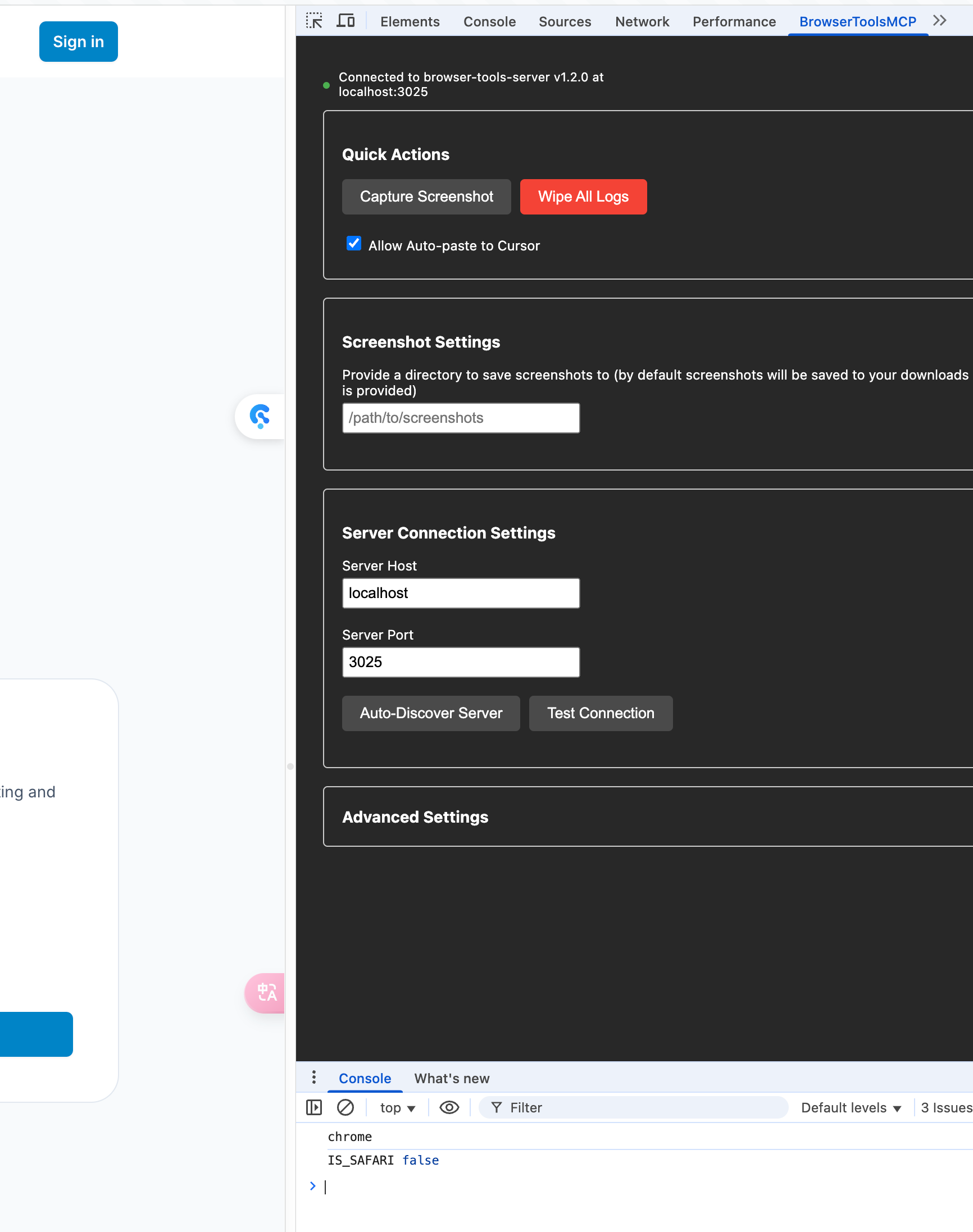
{ "mcpServers": { "browser-tools": { "command": "npx", "args": [ "@agentdeskai/browser-tools-mcp@1.2.0" ] } }}- 先在你的 terminal 中启动
browser-tools-server,保持运行 - 在 cursor 的 global 或者 project
mcp.json填写如上配置,回到 cursor settings->MCP, Click refresh button until it’s green - Open Output panel in Cursor CMD+Shift+P “output”. Change dropdown to “Cursor MCP”. Check if there’s any specific errors in there for browsertools.
- Open the MCP tab in DevTools and ensure the connection was successful.
然后就可以开始愉快的玩耍了
supabase MCP
据说非常实用
sequential thinking
cursor 必备,使用指南待续
search
过去还需要用 brave search 这种 MCP, 现在 cursor 集成了 web search. 我不晓得效果如何,但是让它读个网页还是没问题的。cursor settings 里启用
Puppeteer
除了 browsertools 也有推荐
-
Puppeteer + Chrome DevTools Protocol - This combination has been incredible for debugging. I can ask Cursor to:
- Launch the app in debug mode
- Navigate to specific routes
- Take screenshots of UI components
- Analyze network traffic patterns
- Extract and parse console errors
支持的行为还挺多,可以完成 browser automation 的调试测试,先装为敬。
puppeteer 这货的依赖比较多,刚好它也提供 docker build 工具,那我就用 docker 装了
playwright
类似 puppeteer 的实时浏览器调试,现在爬虫都用 playwright 做 headless js execution.
论坛上的使用分享
Using this MPC Command:
npx -y u/executeautomation/playwright-mcp-server
I have a test file let's call it test.spec.ts that contains something like this:
// Click generate button and handle the dialog  await page.click('button:has-text("Generate")');  await page.waitForTimeout(1000); // Wait for dialog animation  await page.waitForSelector('button:has-text("Confirm Generation")', { state: 'visible' });  await page.waitForTimeout(500); // Brief pause before confirmation  await page.click('button:has-text("Confirm Generation")');
I then ask using playwright, run through test.spec.tx, it opens a chromium window, then does whatever the instructions say, since it has access to the browser and the UI it can diagnose problems and figure out where it went wrong in real time.
github/linear 等
略去了,都很简单,smithery 上找 server 即可
useful instructions
以下 prompt 示例都集中来源于去年 7~9 月,部分过时了。
-
交流的语法错误、typo 都不要紧,比如 negotiate 写成 negotaite、时态语态、单复数 —— 乱写一气都行。但是关键 terminology 不要错
-
避免混淆。比如我有段 feature 是让 server 接到 request 后重写发给另外一个 origin backend. Origin 是专有名词,我项目里一直这么描述。但这个简单的指令我就千万不要说
rewrite the request url combining the origin backend url with the original requested可以说....with the client request it received -
Analyze/illustrate … with Chain of Thought methodology—— 现在推理模型多了,可能不用显式提示 CoT 了 -
Add
this newly created logicto @README.md for later referencein a separate section called Centralized Meta -
now let’s continue enhancing the model adatper for vertexai. the previous worker code is not actually working well on translating the openai llm request to the google vertex backend. I found another piece of code that should work correctly , though it’s in golang. closely examine below 3 files, and fix my implementation of adapter in ts.
remember not to touch my way of model mapping and req handling with google vertex
-
examine the work logics in @vertex-adapter.go and borrow them in our codebase. 从另外一个项目的 codebase 拷贝过来有用的文件/夹,不要进入 repo, 让它参考,用完立刻删掉。
-
most importantly, i need an response reformat layer in the workflow. it shall deal with the logic of different model providers, this starts in model adapers, then in the llm handlers. my goal is to conceal the original error message from the origin not to expose my origin information to the potential customer, and maybe enhance the workflow for other of mine microservices in my architecture. this should be carefully designed and documented.
-
now enhance the load balancing strategy with regards to weight/priority in the provider with best practice, and document your strategy in the code.
-
@codebase, you see, this project is built with cloudflare workers, and features mostly about receiving client initianed LLM request, go through various middlewares to do request manipulation, model routing, and response manipulation, respond. then…
-
… from a production-level perspective
-
@Codebase let’s review how you achieve error handling both in a generic way and in the context of my project as @README.md instructs, most importantly as the adapters’ structure requires. tell me how you understand and implement as of now.
-
be careful not to introduce bloated and unorganized temporary fixes, code systematically
-
same error!!!! this shouldn’t be hard at all !!! just … reflect on the timeline and think carefully
-
imagine a request flowing, go through the middlewares step by step.